
Kit Review 2026: Features, Pros, Cons And Pricing

In this Kit review 2026, we’ll look at Kit in-depth: features, pros, cons and pricing, to help you decide if it’s the right email marketing tool for your needs.
Kit is one of the best email marketing tools. But as great as it is, it’s not suitable for everyone.
Kit Review 2026: Ratings At A Glance
ConvertKit has a lot of positive reviews across different platforms with users praising its simplicity, easy-to-use interface and effectiveness.
- Free Trial: Yes, 14 days
- Starting Price: $15 per month for the Creator plan.
- Email Automation: Yes
- Third-party Software Integrations: 130 integrations
- Customer Support: Offers email support and a knowledge base
What is Kit?

Kit (formerly ConvertKit) is a user-friendly email marketing service created by Nathan Barry for bloggers and creators.
It’s an all-in-one email marketing platform designed to help creators and business owners grow and connect with their audiences, automate their business and sell digital products with ease.
It is suitable for content creators, bloggers and small business owners who want to focus more on content creation and less on the technicalities of email marketing.
What Features Does Kit Offer?
Kit offers a lot of great features. Some key notable ones are:
1. Powerful Visual Automation
Like I always tell anyone who cares to listen, an email marketing platform is useless without automation. Automation takes the manual labour out of email marketing, and Kit reps this rather well.
Kit has a powerful visual automation builder that enables you to create custom automated workflows based on actions, events and conditions. The platform offers advanced automation features that allow users to create complex email sequences and funnels seamlessly.
It also comes loaded with pre-built automation templates that cover most of your business needs.
I love the visual automation builder because it helps you visualise or see what’s happening in your funnels and the path your subscribers take once they sign up for your email list.
2. Email Sequences
With the Kit visual automation builder, you can set up email sequences. You can set up a series of emails known as sequences and send them to your subscribers based on the forms they sign up for.
For instance, you can create welcome sequences to introduce your subscribers to your brand.
Another example is having a product launch sequence to pitch your products/services to your new subscribers to convert them into buyers.
3. Tagging and segmentation
One of the best features of kit is the tagging system that makes it possible to segment your subscribers.
With the tagging system, you only need one email list because it allows you to tag and segment your subscribers as you deem fit.
You can segment based on actions taken, events and conditions. You can have multiple businesses and passions, but still use one email marketing service.
Also, you can add or remove users from campaigns and email sequences, which makes it easy to personalise and tailor your content to fit your subscribers’ needs.
4. Seamless Integration
Kit integrates seamlessly with third-party software and plugins that help you run your business smoothly. For instance, you can use the WordPress plugin to add sign-up forms from your email service to your blog. That way, when people subscribe via your blog, they will automatically be added tp your email list.
This is achieved using Kit’s API system, with over100+ tools at your disposal.
5. Landing Pages and Forms
Kit offers a variety of landing pages and templates to help you capture leads effortlessly. They are mobile-responsive and can be customised to fit your branding.
The Form builder, on the other hand, enables you to create customizable sign-up forms to grow your email list. Integration with your website or blog is seamless, and you can embed forms or use pop-ups.
6. Kit Commerce
Kit Commerce enables you to monetise and earn directly from your dashboard.
You can sell digital products/services, recurring subscriptions, merch, memberships and set up tip jars. All it takes is a few minutes to get it up and running.
Pros and Cons
Pros Explained
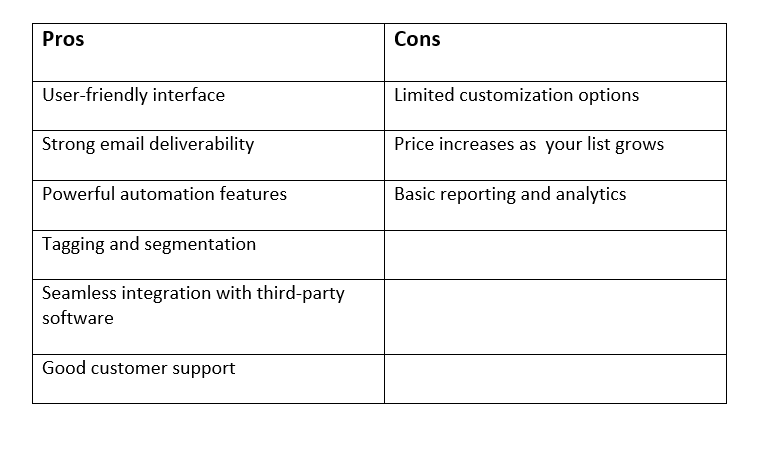
- User-friendly Interface: Kit has a simple, user-friendly email marketing platform.
Kit’s clean and intuitive design makes it easy for beginners to navigate and set up campaigns. Everything is well-defined and easy to locate, plus you don’t need to bang your head against the wall to get a hang of it.
Strong Email Deliverability: Kit has a high delivery rate. This means you can rest assured that your emails will not go to spam.
- Email Automation: Kit excels in email automation, allowing you to create sophisticated workflows with its visual automation builder. You can set up triggers based on subscriber actions, events and conditions. This ensures timely and relevant delivery.
- Tagging and Segmentation: The platform’s tagging and segmentation capabilities are top-notch. You can organise subscribers based on their behaviours and preferences. This feature ensures your email campaigns are targeted and effective.
- Integrations: With over 100+ integrations, Kit connects with popular third-party platforms like Shopify, WordPress, and Zapier, enhancing its functionality and allowing for a smoother business operation.
- Great Customer Support: Users commend Kit for its helpful and responsive customer support, available via email and a comprehensive knowledge base.
Cons Explained
- Limited design options: Kit offers fewer email template options than other platforms, which might be a limitation for users seeking highly customised designs. Also, the templates aren’t as easy to tweak or edit, as customisation is limited.
- Higher pricing for larger lists:Your price increases as your subscriber list grows, whether or not you’re making money from the list. This makes it less cost-effective for businesses with large audiences.
- Basic reporting: The platform’s reporting features are somewhat basic, lacking the depth offered by some competitors. While you get a subscriber graph that shows you which forms and landing pages are growing your list, as well as your open rates and click-through rates, it lacks advanced features and advanced analytics.
Plans and Pricing
Kit offers a tiered pricing model to cater to different needs and budgets. Here’s a breakdown of its plans:
1. Newsletter Plan
The Newsletter plan is free and is perfect for beginners who want to start an email list and build an audience. The plan gives you important tools to build and engage an audience of up to 10,000 subscribers. You are auto-enrolled into the creator network once you sign up.
You get unlimited landing pages, opt-in forms and email broadcasts, audience tagging & segmentation, Newsletter feed & website, API access and 24/7 support. You can also sell digital products and run paid newsletters and subscriptions.
The only downside to this plan is that you only get access to 1 basic automated email sequence, 1 basic visual automation, and only 1 user.
2. Creator Plan
The plan starts at $33 per month for up to 300 subscribers and includes more advanced features than the Newsletter plan. It includes everything in the Newsletter plan, plus free recommendations, paid recommendations, removal of Kit branding, more third-party integrations, RSS campaigns, and polls.
Unlike the Newsletter plan, you get unlimited visual automation template library, automated email sequences & visual automation builder, 100+ third-party integrations and 2 users. Don’t forget, as your subscriber count increases, the price increases accordingly.
3. Creator Pro Plan
The Creator Pro plan starts at $66 per month. It includes everything in the Creator plan plus advanced features such as Facebook custom audiences, newsletter referral systems, insights dashboard , deliverability reporting, subscriber engagement scoring and unlimited users.
This plan is suitable for businesses with a huge subscriber list seeking more sophisticated marketing strategies.
Kit Benefits & Drawbacks
Unique Advantages
Kit’s focus on creators sets it apart, with features that help creators connect with their audiences.
The platform’s dedication to simplicity without sacrificing power ALSO makes it an attractive option for non-tech-savvy users.
Potential Drawbacks
One notable drawback is Kit’s limited design options, which may not satisfy creators looking for extensive customisation.
Additionally, the platform’s pricing model can become costly for larger lists, which might be a consideration for businesses with a huge subscriber base.
How Kit Compares With Competitors
ConvertKit vs. Mailchimp
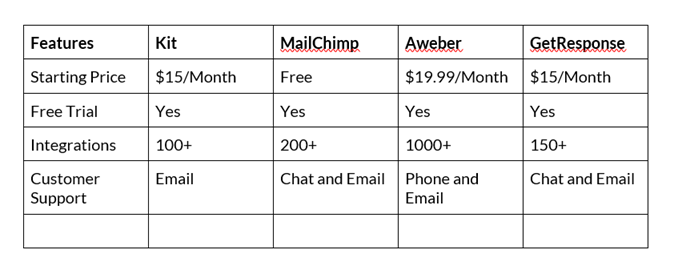
Mailchimp offers more design flexibility and third-party integrations, but Kit is better at automation and simplicity. So, if you care about design customisations, try MailChimp. You can stick with Kit if functionality and ease of use are what you need the most.
ConvertKit vs. AWeber
AWeber provides extensive customer support and more integrations, but ConvertKit’s user-friendly interface and powerful automation make it a better choice for creators focused on content. If you need hands-on help and variety, you need AWeber.
ConvertKit vs. GetResponse
GetResponse has more advanced analytics and webinar capabilities, so if you’re a larger business with more complex needs, GetResponse is your best option. But if you need an easy-to-use email marketing tool with a simple interface and targeted features for small teams and individual creators, stay with Kit.
Final Thoughts
Kit is a great email marketing tool for creators and small business owners of all categories. The interface is easy to use, automation and segmentation are powerful and perfect for building real relationships with your audience.
Design options may not be the most extensive, but ConvertKit’s focus on practicality and creator support sets it apart in the email marketing space. It simplifies email management and gives you the functionality to engage and grow your brand. If you want simplicity and capability, Kit is the one.
Frequently Asked Questions (FAQs)
1. Is ConvertKit suitable for beginners?
Yes, ConvertKit’s user-friendly interface and simple setup process make it an excellent choice for beginners.
2. Can I switch from another email marketing platform to ConvertKit?
Yes, ConvertKit offers migration services to help you transfer your data from another platform with ease. You have to sign up for the Creator or Creator Pro plans to get access to the migration service.
3. Does ConvertKit support A/B testing?
As of now, ConvertKit offers limited A/B testing features, mainly within email subject lines.
4. How secure is my data with ConvertKit?
ConvertKit adheres to industry standards for data security and privacy, ensuring your information is protected.
